
Cause
By default, Safari doesn't accept cookies from cross-site domains, which makes embedding content via iframes problematic. This is especially the case for videos, because Google uses the YouTube player with authorization cookies to deliver the content.
Solution: use the plugin's Media Player
The best fix is to replace the embedded video with the Media Player module of Use-your-Drive. To do so:
- Open the Use-your-Drive Shortcode Builder in your page or post.
- Select the Video Player mode.
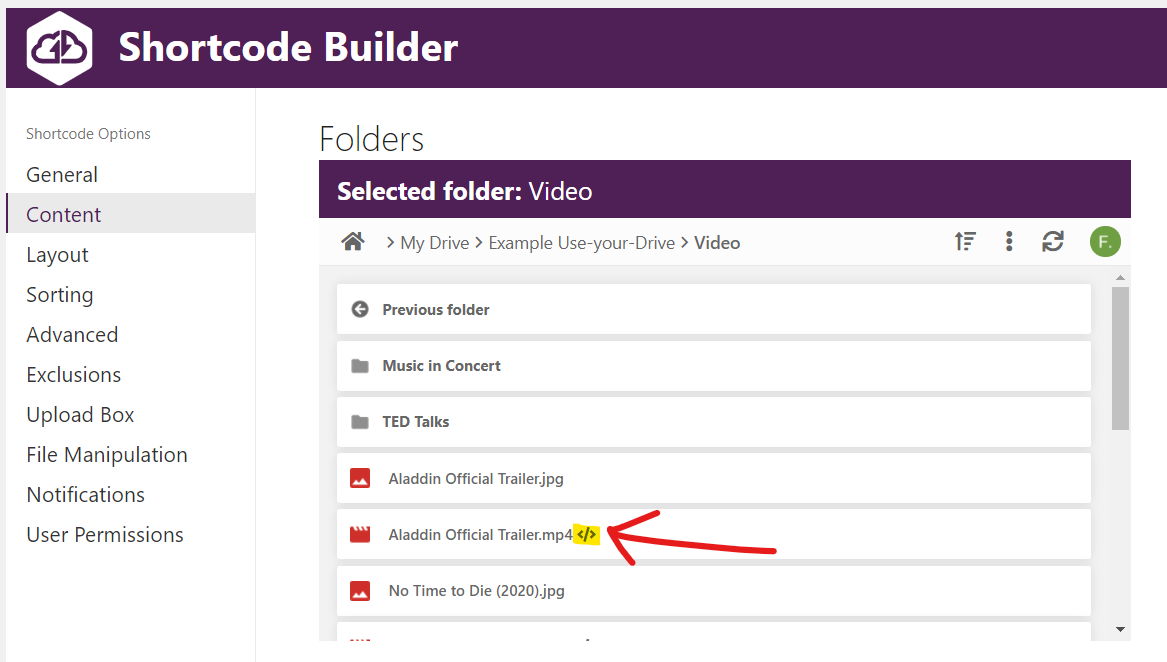
- Open the Folders tab and navigate to your video file.
- Click the
</>button next to the file to embed just that single file in the Media Player.
Alternative solution: disable 'Prevent Cross-Site Tracking' on the visitor's device
This requires every visitor to change a setting on their own device, so it's only useful in controlled environments (an intranet, internal staff, etc.).
macOS
- In Safari, open Settings (or Preferences on older macOS versions).
- Open the Privacy tab.
- Uncheck Prevent cross-site tracking.
iOS / iPadOS
- Open the Settings app.
- Scroll down and select Safari.
- Toggle Prevent Cross-Site Tracking off.